Day 3 sees the release of a new tool – Telltale Speech Extractor.
It enables you to rip the voices and sfx from all games released by Telltale Games (yes that means Sam and Max).
Download it here.
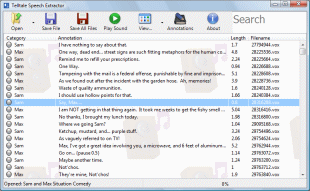
The tool plays the sounds, lets you save them as wav or mp3, can filter them by character and lets you search for specific dialogue. In short, it makes it really easy to browse and search the sounds, especially if you know what you’re looking for.
What makes this tool extra-special though, is its annotation support. See the screenshot below? See how for each sound it lists who said it and whats said? Those are annotations. To quote the readme: “Annotations are descriptive names given to sounds. They list what is said and what character says it. This allows the sounds to be easily browsed, filtered and searched“. The sounds don’t contain any textual information besides the filename, so all of that extra information has been added to the annotations, for every single game.
Unfortunately, despite my best efforts, the annotations aren’t complete. In most games there are still around 50 sounds that don’t have annotations. Who’s going to fix this? Well hopefully you are. Annotation editing is built into the tool and its very easy to use. I just need people to finish the annotations for a game and then send me their annotation file. This is all explained in the readme, so if you’re interested in helping out, just have a look at that.