Telltale Music Extractor – Added support for Jurassic Park

The title says it all.

The reason for the delay is that I wanted to wait until Telltale had sold out of the deluxe edition (which comes with the soundtrack). It seems that they haven’t yet though so I urge you to go and buy it while you can.

Download the Music Extractor here.

USB Disk Ejector 1.3.0.2 – Improved Error Reporting

Another small update for USB Disk Ejector. This one improves error reporting to make it more informative and less scary. There shouldn’t be any “unknown error when ejecting” messages now. Again, many thanks to Bruce Lightfoot for spotting this.

Download it here.

USB Disk Ejector 1.3.0.1 – A bugfix

A small update to USB Disk Ejector today to fix a bug with the last version. If you hovered the mouse over the program when there was no drives inserted it would create an error. Many thanks to Bruce Lightfoot for spotting this.

Download it here.

USB Disk Ejector 1.3 Released!

After 3 years and 6 beta versions I’m finally releasing a new stable version of USB Disk Ejector.

I cant begin to put a number on how many hours I’ve spent working on this. Its now a much more comprehensive program than the old version – there are tons of new features and its much more flexible and configurable.

Please see the readme for the full list of changes and make sure you read the “Upgrading From Previous Versions” section.

Some of the most important changes are:

  • Full card reader and memory card support. You can now eject media, show/hide card readers, hide empty card readers and even define drives as card readers.
  • Mountpoint support. All detection and ejecting is done using mountpoints rather than drive letters, this means that drives mounted in a folder like this are supported.
  • Options window added – options can now be easily set and saved. There are now many settings that can be configured and customised.
  • Much better notifications:
    • Uses balloon hints in the taskbar for notifications instead of a messagebox
    • Much better detection and explanation of the reasons for a failed eject
    • Now notifies (via a balloon hint) when an eject is successful
  • Support for Firewire disks.
  • Big changes to drive detection and ejection code – stops the freezing that could sometimes happen with the old version when trying to eject some types of drive.


Huge thanks to all the people who’ve tested it and suggested features. Please spread the word about this new version.

Download it here.

USB Disk Eject 1.2 Beta 5

Its been a long time since the last beta release and today I’m finally releasing beta 5.  Please see the last beta post for the full list of changes since the last stable version.

Changes:

This version has some minor tweaks behind the scenes but the main change is a bugfix that *should* should stop the freezes that some people were getting when ejecting. However its possible that the changes could have the opposite effect and it might stop disks ejecting for some. Its fine for me but I need people to test this on different versions of Windows.

Please read this first:

This beta is considered fully-functional – i.e. most things should work. See the last beta post for the full list of changes. Please give me feedback in the comments but please try to be specific and give me as much information as possible such as Windows version, what you’re trying to eject etc.

Things that wont work in this beta:

Card reader support is disabled. Ejecting a card reader will eject the device not the card in this beta. I’ll be looking into card reader support again once I’ve got the next stable release done.

Windows 2000 support is broken. I’ve tried my best to ensure that the new features support Windows 2000 but I don’t think it’ll work. I don’t have 2000 to be able to test this.

Link removed – there’s now a newer stable release.

New program released – Monkey Island Music Extractor

The word on the street is that the new retail dvd release of Monkey Island 1+2 Special Edition includes the full high quality soundtrack. Regular visitors will know that my Monkey Island Explorer tool already lets you extract the music (and much more) from the games.

However, the soundtrack in the retail version is stored slightly differently and so needs a new tool. Today I’m releasing Monkey Island Music Extractor – point it to the launcher.pak file and it’ll extract the ogg files within.

Download it here.

[Edit] I’ve now updated the program to support tagging – all ogg files are now automatically tagged. Many thanks to Laserschwert for providing the tags.

Telltale Explorer Returns

The summary.

After 5 years I’m releasing a new version of Telltale Explorer. During that time I’ve continued to develop the program and have used it as a development tool and template for my other programs.

It’s completely different to the last public release – the interface has changed, many more games are supported and it can now extract/view/convert all the common resources types (text, images, speech, music). If you are looking to dump music or voices you should still use the Telltale Music Extractor and Telltale Speech Extractor programs as they are specialised for the job.

There are some important caveats to this version that you can read about below.

Why have I released this now?

This is the first public release of Telltale Explorer since 2006 – 5 years ago. During that time I didn’t release any new versions as it was suggested that having a program like this floating around would harm Telltale. Since then though, other people have released programs that open, extract, translate and even recompile ttarch files (telltale archives). The rationale for not releasing this program therefore has gone.

I still have no wish to cause Telltale any inconvenience or problems though – so there are some safeguards written into this program.

  1. It only supports games that are at least a year old. This is to help prevent any possible complaints by Telltale’s licence partners and to stop people poking inside the datafiles of ongoing episodes and spoiling game-based competitions like the TMI one.
  2. Game launcher ttarch files cant be opened and any launcher files (html/css) inside regular ttarch’s are hidden. These files are only used for the launcher program and there’s no reason for anyone to mess with these. They don’t affect the games at all.

Where can I get it?

Download it here.
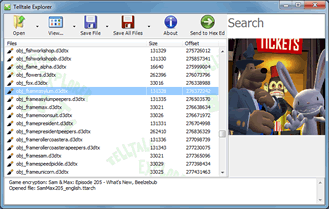
Telltale Explorer

Quick and Easy needs YOU!

Its almost Christmas, which means its time for MixnMojo’s end of year polls. One poll is of particular interest – the “best hosted site” poll. As I write this Quick and Easy Software is in second place.

If you’ve ever used any of the software on this site you are morally bound to buy me a drink if you ever meet me, or failing that – vote for this site in the Mojo poll.

Go vote. You know you want to.