USB Disk Ejector – Another Small Update (1.1.2)

I’ve just released another update to the USB Disk Ejector. Its a minor update and fixes a bug introduced in the previous version. If a computer had a network drive that was inaccessible then the program would produce an error message and wouldn’t show any USB drives. Version 1.1.2 fixes this.

Many thanks to Michael Carman and Victor Rades for reporting and helping me fix this error.

Download it here.

USB Disk Ejector Updated – Version 1.1.1

I’ve released a small, interim update to the USB Disk Ejector. It fixes a bug where the /Showeject switch was ignored when combined with /Removethis.

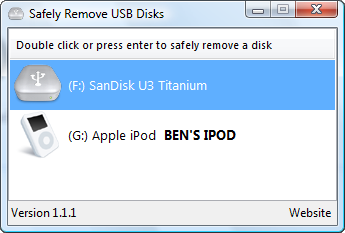
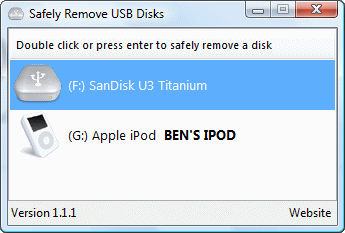
In order to justify a new release I’ve also included two requested features. Firstly, proper Windows 2000 support. I know some people were disappointed that the old version didn’t work on Win2K – well now it does (for real this time). Secondly, displaying disk/volume labels. If you’ve given a disk a name it will now be displayed in bold and you can see an example of this in the screenshot below.

I still don’t know exactly when the next version of the program will be released. I don’t have much free time at the moment but I’m still slowly working on it. You can see a mind-map containing all the proposed features for the next version here.

As always, feel free to get in touch with me via my contact form if you have any problems or feature requests that aren’t on the mind-map.

Download it here.

[Update] It seems that some people have issues using the program when they have network drives that aren’t accessible. I think I’ve identified the problem and I’m just waiting for a few more people to test the fix. I’ll be releasing an updated/fixed version soon.

USB Disk Ejector

USB Disk Ejector – A Status Update

Wow. I wasn’t expecting that. Over the last few weeks, various big sites linked to the USB Disk Ejector. Many thousands of people have now downloaded the program and I am thrilled at the thought that one of my programs is in use by people all over the world.

Many thanks to those that have donated, I really appreciate it. You should all have had a thank you email, if you haven’t received one it may have been caught in your spam filter. Thanks also to those that commented or emailed me about the program. All feedback is useful and although I may not be able to implement every suggestion I will do my best to fulfil most requests.

A list of the ideas and proposed features for the new version can be found here. It was compiled from all the requests people sent me, along with a few ideas of my own. Work on the next version is happening slowly; unfortunately all the interest in the program coincided with a very busy period of my life. I have very little free time at the moment and this will be the case up until the end of April. After that I hope to be able to put in a lot more work on the program and get a new version released fairly quickly.

Until then, you can subscribe to my RSS feed here and please feel free to get in touch with me via my contact form if you have any problems or requests that aren’t featured on the list.

Quick And Easy Week – Day 7: USB Disk Ejector

Quick and Easy week comes to a close with the USB Disk Ejector.

This was originally a program that I wrote for my own use and released just to see if anyone found it useful. Apparently people did and it was surprisingly popular.

In response to user requests I’ve now beefed it up significantly. This new version has been completely re-written and has many new features. It now works on Vista, can run as a command line application and can eject drives from the command line based on drive letter, drive name or partial drive name.

The new command line options make it especially suitable for use with a flash/pen drive, especially if you use a menu such as PStart or the Portable Apps launcher. Eg. I have PStart setup to run the program with the command line option “/EJECTTHIS’. When I run it, the program loads silently, ejects the pen drive and exits. This works regardless of the drive letter that Windows assigns the drive. I strongly recommended that you check out the readme for more information on the new command line options and how they can be used.

New in version 1.1:

  • Now works on Windows Vista. It’s only been tested on XP and Vista but should work with earlier versions of Windows too.
  • Changed to ‘silent ejection’ by default. There are now no messages shown when a device is successfully ejected, messages are only shown when there is an error and the eject fails.
  • The keyboard can now be used to eject drives (press enter).
  • Completely reworked the command line options, the old ones were removed and new ones added. See the rest of the readme for more information on these.
  • Drives can now be ejected entirely from the command line. You can specify a drive letter, drive name, or partial drive name.
  • Mobile mode has been removed, its now automatic. The program will restart itself in mobile mode when appropriate.
  • Completely rewrote the drive scanning code. USB devices that dont identify themselves as removable disks can now be managed by the program.
  • Uses Vista fonts when running under Vista.

Download it here.


USB Disk Ejector

New – USB Disk Ejector

USB Disk Ejector – a program that allows you to quickly remove USB devices in Windows XP. It’s essentially a replacement for the ‘safely remove hardware’ feature, but is quicker and simpler than drilling down through the safely remove hardware dialog. That`s the idea anyway.

I originally made this for my own use, so your mileage may vary.

USB Disk Ejector

Get it here.